
Coupons vary by location and knowing how to change your zip code on Coupons.com will come in handy. With a redesigned user interface, it has become difficult to determine how to change the zip code at Coupons.com. But don’t worry, here is the answer!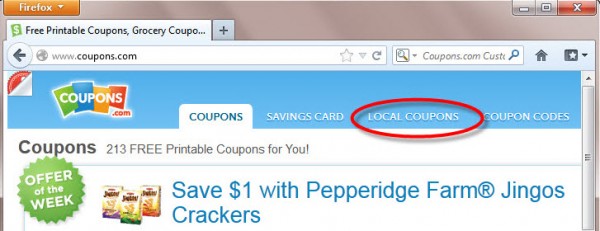
- Head over to Coupons.com; and click on the words Local Coupons on the homepage
- In Local Coupons you will see the “old” zip code area to the left. Enter in your zip code or any zip code.
- Click on the orange arrow and then either Coupons on the top menu or from the left side menu. This will take you back to the printable coupons on the homepage and you will see any new coupons for that zip code!

Thanks The Centsible Family!
 Leandrea is a married mom of two girls, ages 13 and 12, living in Atlanta, GA. She is passionate about helping people save money one coupon at a time. Read more