
I.Need.To.Lose.10.Pounds. There, I said it. I really, really, want to lose those 10 pounds, but I can’t. A few friends and I started doing a Biggest Loser challenge at the end of 2011, but none of us were doing all that great….ok, I take that back….I wasn’t doing that great. Our deadline kept getting pushed back further and further and I actually forgot what the winner’s reward was. So I decided that I wanted to do something different – I wanted to run a Biggest Loser Challenge that was short. We are talking 4 weeks worth of weigh ins. I posted about my endeavor on my personal Facebook page to see how many people were interested, and I was surprised that so many people wanted to join.
Setting up your own Biggest Loser challenge is easy! Using Google Documents you can do everything you need to do! To use Google Documents you need to have a google account (that means gmail). Then head to https://docs.google.com/#home Once you are there it only takes a few clicks and you can make a form like I did for people to sign up.
Once you are logged in and at the Google Docs page, click the red “Create” button.

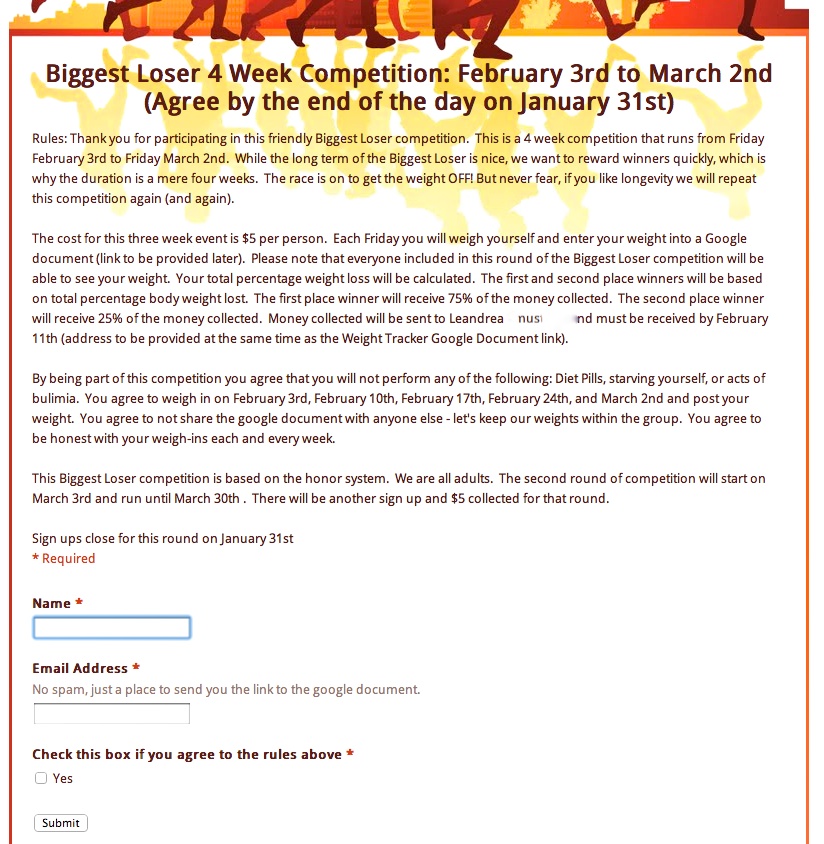
Then create a “Form” for all of the participants to fill out. I included all the nitty gritty in my form (as I am sure you can read from the photo above). To edit the prepopulated form all you need to do is click the pencil that you see on the right. There are several different “Question Types” but if you are gathering people’s information then you will more than likely only need the “text” option. If you need to add another question use the green + sign that says “Add Item.”
Once you have your Title, Description, and Questions complete you can change the look of your form. There are 97 themes – and hopefully one fits what you had in mind.

Once your form is complete click the “Email This Form Button” and email the link to yourself.

Send that link to anyone who is participating (or post to Facebook or Twitter) and have participants fill in their information before a deadline you determine.
To see everyone’s responses head back to docs.google.com and click the link of the document you just created. You will see everyone responses. Pretty cool, right? Did you make a mistake or want to edit your document? While you are looking at your document click “Form” then “Edit Form” from the drop down menu.
I hope you found this tutorial informative and maybe even inspiring. If you have any questions or are just really confused please leave a comment or send me an email and I will do my best to help!
If anyone wants a tutorial on what to do with everyone’s data, I could be persuaded to write a tutorial on that too!
 Leandrea is a married mom of two girls, ages 13 and 12, living in Atlanta, GA. She is passionate about helping people save money one coupon at a time. Read more